


VSim: SMS Verification Code
4.74.30K Reviews
App Specs
- Version
- 3.1.0-gp
- Updated On
- License
- Free
- Downloads
- 1,000,000+
- Developer
- Elmond Technologies
- Categories
- Communication
- Platform
- Android
Screenshots
 Analysis by AppCompare
When a service asks for a phone number just to send a one-time code, I pause before handing over my personal line. A separate number can be useful, but it also changes how dependable the verification process is. VSim: SMS Verification Code is built around that trade-off: it gives you access to virtual numbers for receiving SMS codes, so you can try to keep routine sign-ups apart from your everyday number.
The appeal of a number that is not your everyday line
That separation is the central reason I would consider this communication app. Using a virtual number can reduce how often your main number is shared with services you may use only briefly. It is not a guarantee of anonymity, and I would not treat it as a replacement for a secure personal number, but it can be a practical buffer for low-stakes registrations and short-lived tasks.
The distinction matters most when you think beyond the first code. A phone number can become an account recovery route, a login requirement, or a way for a service to reach you later. I would therefore decide whether I might need that account again before choosing a temporary number. If losing access would cause trouble, using a number you control long-term is the safer choice.
How I would approach a verification request
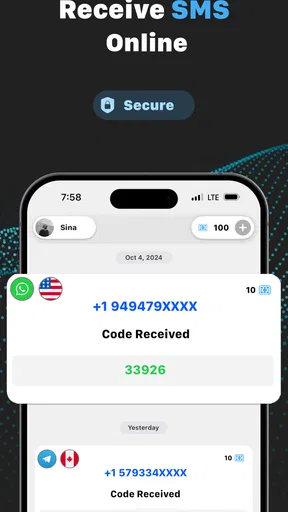
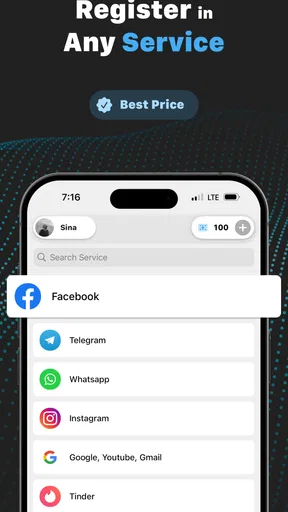
In practice, I would first check whether the service accepts a virtual number at all. Then I would select a number in VSim, enter it on the service’s sign-up screen, and wait for the text to arrive in the app. The useful part is having a separate place to look for the verification message rather than mixing it with texts sent to my regular line.
I would keep the process focused: request one code, give the service a moment to send it, and avoid repeatedly requesting new codes while the first is still pending. Multiple requests can make it harder to tell which message belongs to which attempt, especially if a website invalidates an earlier code when it sends another. A little patience is more useful than tapping through the flow in a rush.
VSim is free to install, though it includes in-app purchases priced from $0.99 to $49.99 per item. I would check the current in-app cost before relying on a particular number or making a plan around repeated use. That is especially important if you only need one verification: the relevant question is the cost of the option you intend to use, not simply whether the app itself is free.
Where it fits better than the usual alternatives
Compared with using your personal SIM, a virtual number offers more separation but may be less dependable for services that screen out shared or temporary numbers. A second physical SIM or a separate long-term mobile line is usually a better fit when you need ongoing access, account recovery, or a number that is clearly yours. VSim makes more sense when the task is limited and the number is not meant to become part of your permanent identity.
Worth Reading Before You Choose

Flipboard Shows What News Apps Must Do Beyond the Feed

Switching to Android Auto Means Rethinking Your Driving Routine

Google Calendar Makes a Crowded Week Easier to Manage

Ludo King Makes the Most of the Minutes Between Plans

Baby Panda World Brings Quick Play to Modern Phones, but Its Game Library Feels Busy

ESPN’s Live Game View Makes Following Close Games Easier
Email sign-up is simpler when a service allows it, but it cannot replace SMS verification when a phone number is required. I would use the least sensitive option that the service accepts: email for ordinary accounts, a virtual number for a low-stakes phone check, and my regular number when the account is important or needs reliable recovery. That order keeps convenience from turning into an avoidable lockout.
Privacy has boundaries
A virtual number can help keep your personal number out of one sign-up form, but I would not use it to bypass a service’s rules or to create accounts that depend on misleading identity details. Some platforms reject temporary numbers, and that can happen before a code arrives. In that situation, repeatedly trying different numbers may waste time; switching to a supported verification method is the more sensible move.
I would also avoid using a temporary number as the sole recovery route for anything important. If the number later becomes unavailable, a future login or password reset could be difficult. Before completing registration, check whether the service lets you add another recovery method, such as an email address or an authenticator option. That small step can prevent a convenient one-time sign-up from becoming a long-term access problem.
Who is likely to get the most from it
VSim is most appealing to people who occasionally need SMS verification but do not want every short-term service tied to their main number. It may suit someone checking out a new platform, a freelancer separating a quick test account from personal contact details, or a traveler who encounters a service asking for a number while away from home. The best fit is someone who can tolerate a failed verification and does not need the number to remain theirs.
I would skip it for banking, essential work accounts, healthcare services, or any profile where a phone number is a critical recovery key. In those cases, a stable number under your control is worth more than the privacy buffer of a temporary one. It is also not ideal if you expect to receive ongoing messages or need to prove that you own the same number later.
What Exactly is VSim?
VSim: SMS Verification Code is an app that provides temporary phone numbers for receiving SMS verification codes. Imagine not having to give out your real number every time you sign up for something. It’s like having a secret identity in the digital world. Pretty cool, right?
Getting Started
Setting up VSim is a breeze. Once you download and install it, you're greeted with a simple, user-friendly interface. The app doesn’t bog you down with unnecessary clutter, which is a huge plus in my book. You just tap a button, and voilà, you get a temporary number that you can use for all those pesky verification messages.
One thing I loved about VSim is how intuitive it is. Even if you're not the most tech-savvy person out there, you’ll find navigating through the app straightforward. Plus, the developers have done a stellar job of ensuring that the app runs smoothly without any hitches.
Features That Stand Out
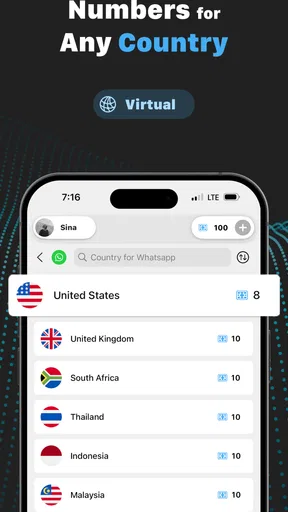
Now, let's talk features. VSim offers a variety of numbers from different countries, which is perfect if you're dealing with international services. The app automatically updates the list of available numbers, so you're never stuck with a number that doesn’t work.
Another feature that I found incredibly useful is the app's ability to handle multiple verifications at once. You can receive several verification codes simultaneously, which is perfect if you're setting up multiple accounts or services. No more waiting around for one code to arrive before requesting another.
Why Choose VSim?
Privacy is the name of the game with VSim. In today’s world, keeping your personal information secure is more important than ever. By using a temporary number, you’re ensuring that your real number doesn’t get flooded with spam or unwanted calls.
Another reason to love VSim is its cost-effectiveness. Instead of purchasing a separate SIM card or using expensive services, VSim provides a budget-friendly alternative. You only pay for the numbers you use, and there are no hidden fees lurking around the corner.
Real-World Application
Picture this: you’re traveling abroad and need to access services that require a local number for verification. Instead of buying a local SIM, you can simply fire up VSim and you're good to go. It’s a lifesaver for travelers, freelancers, and anyone who values their privacy.
Businesses can also benefit from VSim. Whether you're testing apps, setting up accounts, or conducting customer research, having temporary numbers at your disposal is invaluable. It streamlines operations and keeps personal and professional communications separate.
A Few Words of Caution
While VSim is fantastic, it's worth noting that not all services accept temporary numbers. Some apps and websites are getting wise to the game and might require a real number. However, for the majority of services, VSim works like a charm.
Also, remember that these numbers are temporary, meaning they're recycled after a certain period. So, if you need long-term access to a service, it might be worth considering a different approach. But for quick sign-ups and verifications, it’s perfect.
Final Thoughts
All in all, VSim: SMS Verification Code is a fantastic tool for anyone looking to keep their personal number under wraps. It’s reliable, easy to use, and incredibly practical. Whether you're signing up for a new app, traveling, or running a business, VSim has got your back.
If you're tired of handing out your real number like candy, give VSim a try. It might just become your new favorite app for maintaining digital privacy.
Checking fit before you commit
A useful routine is to decide what the number is for before opening the app. If I only need to confirm access to a one-off service, a temporary number may be a reasonable convenience. If I am testing an app as part of work, I would record which test account used which number in a private note, without storing the received code longer than needed. That simple separation helps avoid mixing a test login with a personal account later.
Country choice deserves a moment of thought, too. A number from another country may appear convenient, but the service receiving it can apply regional rules or require a number from the place where the account is used. I would choose a number that matches the service’s requirements rather than assuming that any available country will work. This is a practical way to reduce failed attempts, not a promise that a particular service will accept it.
A realistic use case—and its limits
Imagine I am comparing a few online tools for a short freelance project. One asks for a phone number before letting me explore its account area, while the others allow email registration. I might use a VSim number for that initial, low-stakes check, then decide whether the service is worth keeping. If I continue using it, I would add a stable recovery method or move the account to a number I control. The virtual number helps with the trial stage; it should not quietly become the only key to a lasting account.
For a traveler, the same distinction is important. A virtual number might be handy when a service requests SMS during a brief trip, but it is not the same as having a local SIM for calls, mobile data, or dependable two-way contact. If I needed continuous connectivity or had to receive messages over time, I would choose a carrier line instead. VSim addresses the verification step, not the broader job of staying connected.
Small habits that make the workflow safer
I would keep a short private record of the service name and the purpose of each temporary number while setting up several accounts. That avoids the common mix-up of seeing a code arrive and forgetting which registration triggered it. I would also finish each sign-up before starting another where possible, even though handling more than one verification can be useful. Parallel requests save waiting only when each service clearly identifies its own code; otherwise, they add confusion.
Before closing a registration, I would confirm that the account has another recovery route if I plan to keep it. If there is no alternative and the service matters, I would stop and use a lasting number instead. This is a better decision point than discovering months later that a password reset depends on a number that is no longer available.
What to expect from the app as a product
Appnest Technologies develops VSim, which sits squarely in the communication category rather than acting as a general messaging app. It is free to download, rated for Everyone, and has a 4.7 average from around 204,000 ratings, with over a million installs. Those figures suggest that many people have tried it, but they do not guarantee that a particular website will accept a particular virtual number. The verification service on the other end still makes that decision.
The app was released on August 29, 2023, and version 3.0.2-gp requires Android 6.0 or later. I would check that requirement before installing on an older device. Its free download also should not be confused with unlimited use: in-app purchases range from $0.99 to $49.99 per item, so I would review the price shown for the specific option I want before proceeding.
When another option is the better answer
If I need a durable number that can receive future login codes, a second SIM or a separate mobile line is the more reliable choice, even if it involves more setup. If the service accepts email, that may be simpler still. A password manager and an authenticator app can also be preferable for accounts that support them, because they avoid making SMS the only checkpoint. The right choice depends on whether I value a quick privacy buffer or predictable access over time.
My recommendation is therefore narrow but positive: use VSim for short, low-consequence verification when keeping your personal number separate is useful, and treat acceptance as service-dependent. I would not build an important account around a number I may not keep. Used with that boundary in mind, it can be a convenient extra tool; used as a substitute for a permanent line, it risks turning a quick sign-up into a recovery headache.
Pros
- Easy setup and user-friendly interface.
- Supports multiple countries for SMS verification.
- Fast delivery of verification codes.
- Offers a free trial for new users.
- Secure and private handling of data.
Cons
- Limited free usage before payment is required.
- Not all apps support virtual numbers.
- Connection issues in some regions.
- Pricing may vary based on location.
- Occasional delays in receiving codes.
FAQs for VSim: SMS Verification Code
What is VSim: SMS Verification Code used for?
VSim: SMS Verification Code is an app designed to help users receive SMS verification codes without using their personal phone numbers. It provides virtual numbers from various countries, allowing for secure and private verification when signing up for services or apps that require phone number authentication.
How does VSim ensure my privacy and security?
VSim prioritizes user privacy by offering temporary virtual numbers that can be discarded after use. These numbers prevent your personal data from being exposed to third parties. The app uses encrypted connections to secure the transmission of SMS messages, ensuring that your information remains confidential.
Can VSim be used for all types of services?
While VSim supports a wide range of services and apps, it may not work with every platform. Some services have restrictions or do not accept virtual numbers for verification. It’s advisable to test the service with VSim before relying on it for critical tasks. The app’s community forums can be helpful for sharing user experiences.
Is VSim free to use, or are there any costs involved?
VSim offers both free and premium options. Free users may experience limited functionality or access to fewer virtual numbers. The premium version provides more features, such as access to a broader range of numbers and countries, and priority support. Check the app store for detailed pricing and subscription plans.
What should I do if I encounter issues with receiving SMS codes?
If you experience problems receiving SMS codes with VSim, first ensure you have a stable internet connection. Try selecting a different virtual number as some numbers may be temporarily unavailable. If issues persist, contact VSim’s customer support for assistance. They can provide troubleshooting tips and help resolve any technical problems.


